Sunday, August 28, 2011

3 PIC Microcontroller & Wireless Transfer


3.6    Wireless Data Transfer

We transfer the control signals in our project using wires from PC to the PIC microcontroller.

To advance the project we use the radio frequency transmitter and receiver module for a wireless control transfer signals as another options.

The Compact FM Hybrid  transmitter and receiver Modules are used in this project to receiving a signal data at up to 9.67kbps of the state of the transmitter with rang up to 250 m with CMOS/TTL Compatible Output, offers low current consumption , which uses no adjustable components ,and requires No radio license to operate . The transmitter is attached to the serial port on the PC to send data on the 433.92 MHz carrier to the motion control subsystem.

Figure 3.8 Radio frequency (RF) – Receiver and Transmitter


3.6.1 Receiver (RX)

Figure 3.9 Receiver IC (RX)


Table 3.2 Pin description for Receiver


Table 3.3 Operation mode for Receiver

Technical Specifications

Table 3.4 Technical Specifications for Receiver

3 PIC Microcontroller & Wireless Transfer


3.5 Circuit Layout

Figure 3.6 PIC16F876 hardware interface connections


Figure 3.7 PIC16F876 hardware interface board


The previous figure shows the connection between the PIC microcontroller and the hardware components such as the stepper motors, D.C motors, light and so on. A crystal of 10MHz is connected to the CLKIN pin to generate the clock of the PIC. The data from the RF is received through the RA3 pin (pin5). Every one of the three D.C motors need three lines for direction and speed control(Enable,IN1,IN2) and the stepper motor needs two lines for direction control(Enable,(CW/CCW)). The output control lines of the microcontroller in this table shown below:

RB0
ENABLE (PWM)

RB1
IN 1
D.C motor 1
RB2
IN2

RB3
ENABLE (PWM)

RB4
IN1
D.C motor 2
RB5
IN2

RB6
ENABLE

RB7
IN1
D.C motor 3
RC0
IN2

RC1
ENABLE
Stepper
RC2
CW\CCW
motor
Table 3.1 Output control lines of the microcontroller

Saturday, August 27, 2011

3 PIC Microcontroller & Wireless Transfer


3.3    PC software

We used the visual basic 6 language to transmit the control signal to the serial port.
The visual basic program gives ability to control the robot by the user orders.


3.4    PIC programmer

PIC microcontroller is able to run programs written in assembly, PicC and PicBasic. You can purchase the programmer, but it is too expensive. In our project we design a new circuit as shown in figure 3.2 that is programming PIC 16F876 chip. The programmer don’t require a separate power supply, put takes the power from the serial port of a PC.

Connection with the PC is made by a cable 1-1, 9 pin connectors, male-female.

Figure 3.4 Programmers for PIC microcontroller

Programming the PIC microcontroller family can be done by changing the wires of this programmer to the same name pins of the other PIC new chip.

Figure 3.5 The programmer for PIC16f876

3 PIC Microcontroller & Wireless Transfer


3.2    Serial port interface

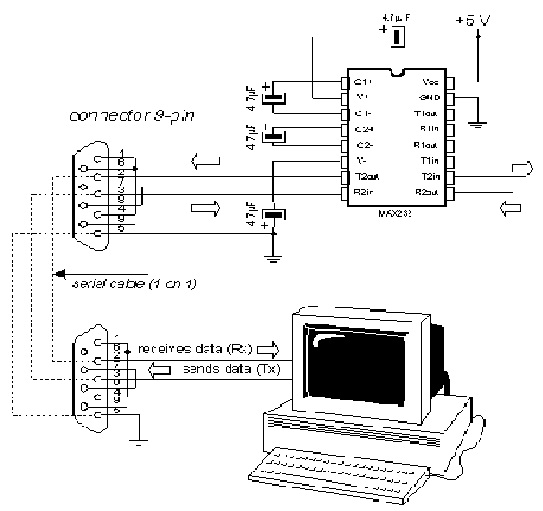
The transmitting signal from PC ranges from 12 Volts to –12 Volts (RS level) which is not compatible with the PIC microcontroller or with the RF transmitter which required a voltage setting of +5 Volts to 0 Volts (TTL level), so we must put max232  as a level shifter between RS level and TTL level .
Figure 3.2 MAX232 IC connections


Figure 3.3 Connection between serial port in PC and MAX232 IC


3 PIC Microcontroller & Wireless Transfer


3.1 PIC16F876 Microcontroller

The PIC16F876 is the “brains” of the Drive Subsystem. Using built-in RS232 interface, we were able to use two pins for transmitting (from user). We were able to check what inputs were coming in from the user and then decided which signals to send out to move the motors. By using the built-in Pulse width Modulating channels, we were able to control the speed of the two D.C motors at the same time. The remaining pins were general input and output pins and were used for outputs to control the stepper motor and D.C motors direction.

Figure 3.1 Pin Diagrams of PIC16F876

2.3 Power Supply


In our project, 5 Volts was required for all the integrated circuits, 12 Volts was required For the D.C motors and 8Volts for stepper.

 We use 5 Volts Regulator (LM 7805) to feed the integrated circuits, and 8 Volts regulator (LM7808) for the stepper motor.


2.3.1  LM78XX Regulator

The most common way of generating afixed voltage is to use the 78xx voltage regulator which has atypical tolerance of 5%.


Figure 2.12 LM78XX circuit diagram

2.2 Robot Drives

2.2.4 Stepper Motor Drives

The stepper motors used in our design contain four input wires, one to each coil, plus a common voltage input. The stepping sequence of the motor can be controlled differently by assigning the input pulse on different combinations to the inputs A, B, C, and D indicated on figure 2.8 below.

Figure 2.8   stepper motor terminals

The possible stepping sequences are wave-drive, two-phase, and half-step. The wave-drive format activates one coil at a time in an A-B-C-D (or D-C-B-A, if reversing rotation direction sequence). The wave-drive mode consumes the least amount of power and has high positional accuracy.

Two-phase drive activates two adjacent coils during each sequence (AB-BC-CD-DA). This sequence mode offers an improved torque while decreases the rotation speed of the stepper motor.

 Half-step activation alternates between the one-coil and two-coil modes (A-AB-B-BC-C-CD-D-DA), providing an eight-step sequence for smoother rotation.


2.2.4.1 UCN5804 Stepper Motor Driver

The stepper motors use a 9-12 Volts to support the movement of the camera. We use the integrated circuit stepper motor driver UCN5804B which can drive up to 50 volt 1.5 an output, and the inputs are compatible with TTL circuits. This driver provides four Darlington transistors at the output connecting to the stepper motor.

The following is the circuitry for each stepper motor with the UCN 5804 Integrated Circuit stepper motor driver.
Figure 2.9   UCN 5804 stepper motor driver

From the figure above, pin 9 and 10 determines the stepping sequence of the stepper motor. Since we decided to use two phase stepping sequence, and according to the truth table below, both pin 9 and 10 are at logic 0.
Table 2.2 Logic control for the stepper sequence


2.2.4.2 Circuit Connections

Figure 2.10 UCN5804 circuit connections

Figure 2.11 UCN5804 circuit and 555 IC board

As displayed in the figure 2.10 above, pin 9 and 10 are also used for ON/OFF switch of the stepper motor. This is because when both pin 9 and 10 are high, the step inhibit function is performed by the UCN5804 chip to stop the motor from running. Since our project only requires both pins to be low (half-step) or both high (step inhibit) at the same time, only one ON/OFF switch needs to be connected to both pins. The a, b, c, d pins in the figure are connections to the input pins of the stepper motor. Each input signals will control motor in the way described by the stepper motor section previously discussed. The diodes, LEDS, are put in so one can visually observe the stepping sequence and for debugging purposes. The direction (pin 14) is used to rotate the stepper motor clockwise or counterclockwise.